

First things first: LANGUAGE and TIME ZONE
First things first: To get the most out of your account, be sure to set your language and time zone!
In section 9, “Account,” you’ll find the relevant account settings under “Language” and “Time Zone.”
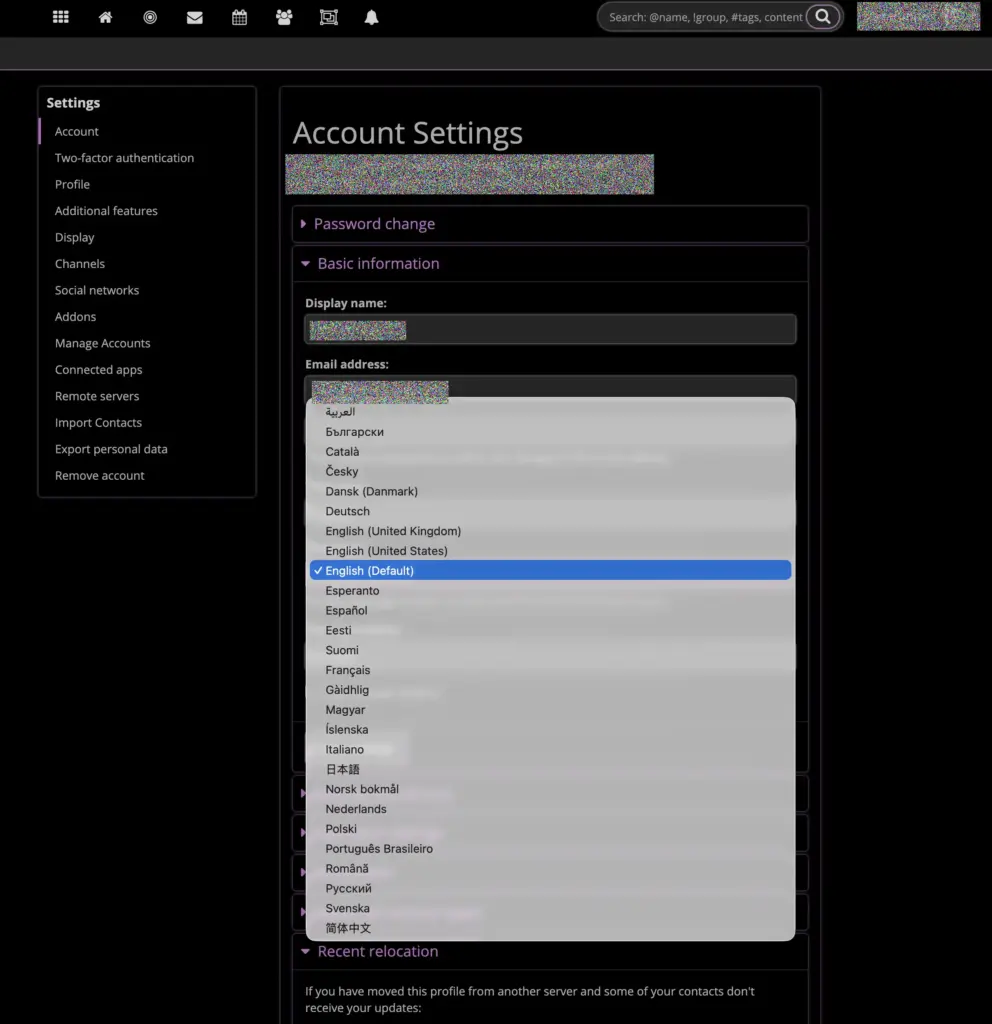
Additional settings:
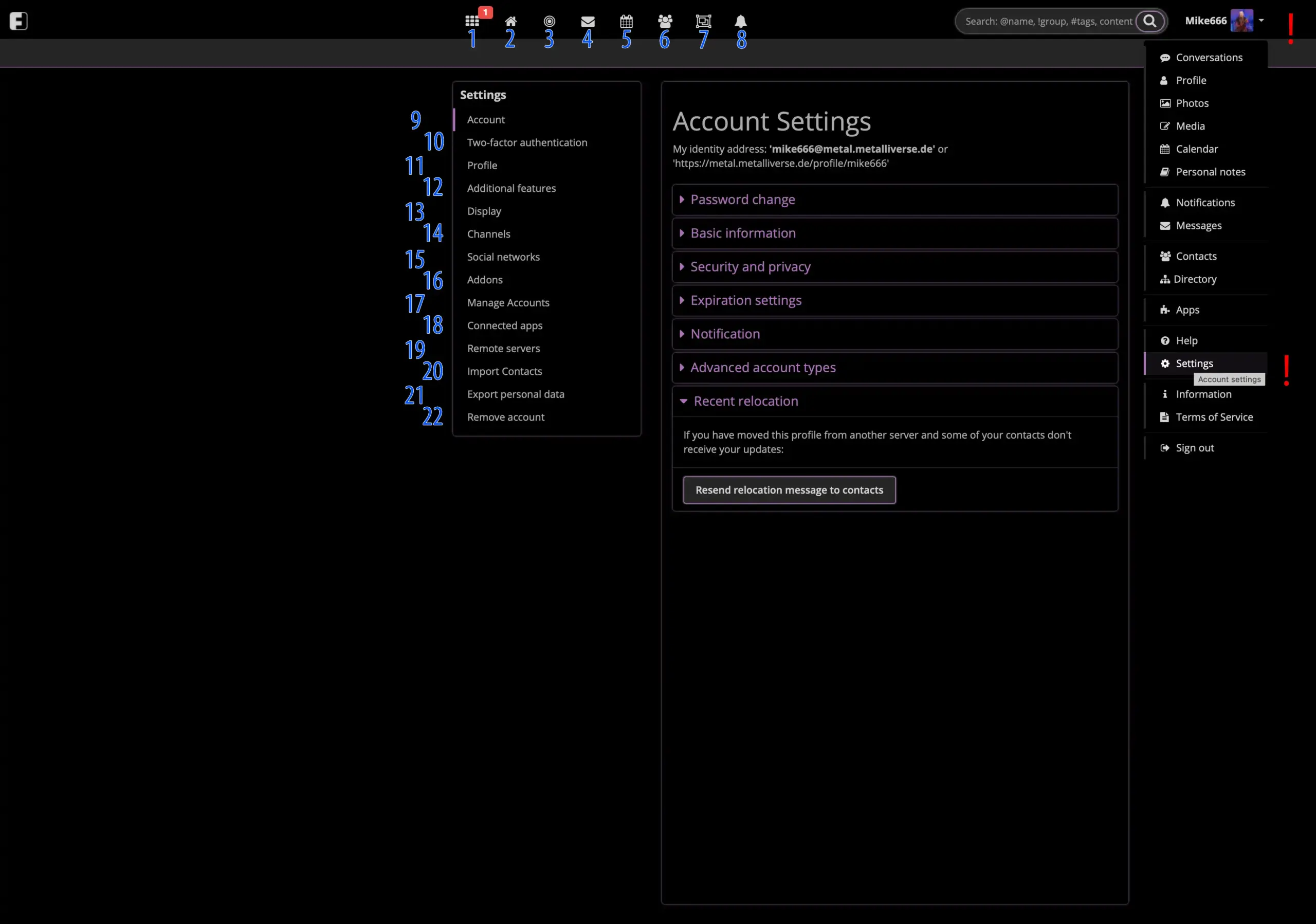
1: Conversations of your contacts
Here you can see all posts from your contacts and the groups you’re active in.
Note: You can customize what you want to see.
However, your contact must also adjust their settings accordingly—for example, to allow you to find them, etc.
2: Your own posts and conversations
Here you can see all the posts you’ve started.
3: Conversations on this and other servers
Here you can see all posts from the Metalliverse and its various servers.
4: Messages
Here you can see all the messages you’ve exchanged with your contacts.
5: Calendar
Here you can see your calendar.
If you check the “Share event” box when creating a new entry, you can share the event just like a post.
6: Contacts
The section about your contacts.
Sorted by circles, etc. You can search for names or connect with known Metalliverse addresses.
You can see which contacts are blocked, which contact requests are pending, etc.
7: Groups
Here you can see all the groups in this Metalliverse instance.
Once there are multiple instances, we will provide a general groups page listing all the groups across the different instances so you can access them directly.
8: Notifications
Here you’ll find information and notifications when people follow you, there’s news, or you need to approve someone, etc.
9: Account
- Password Settings:
Set a new password (old password required). - Basic Settings:
E.g., change display name and language into yours - Security/Privacy Settings:
What can other users see and post on your profile?
Can you be found in search results, etc. - Expiration settings:
E.g., should your posts, etc., expire at some point?
Notification settings:
When and about what would you like to be notified? - Account/Page type settings:
Account as a private individual, company/organization, or forum/group? Automatically accept followers or only with approval?
10: Two factor authentication
Greater security for your account.
11: Profile
- Change profile picture
- Display name, description, birthday
- Location
- Miscellaneous items such as keywords (to make it easier to find you in searches and for contacts)
- Define your own profile fields
12: Additional Features
Additional settings such as hit clouds, category display, menu items, etc.
13: Display
What should be displayed and how: languages, timeline, calendar, etc.
14: Channels
Define own channels.
15: Social networks
Settings for sharing on other social networks.
16: Addons
Language filter, what should appear as the homepage after you log in, etc.
17: Manage acounts
If someone follows your page or profile, you can designate them as an “Administrator” of your page here. NOTE: Administrators cannot change settings.
Important for groups with multiple editors.
Once a user has been designated as an “Administrator,” they will see an additional menu item called “User Accounts” in the menu on the right (exclamation mark in the graphic). There, the user can select which account they are currently using to visit METALLIVERSE.
18: Connected apps
Irrelevant for the average user.
19: Remote servers
Once there are multiple instances in the METALLIVERSE, you can choose to ignore certain ones here.
(not recommended)
20: Import contacts
Irrelevant for the average user.
21: Export personal data
Here you can export your account information.
22: Remove account
You can delete your account here.
PLEASE NOTE: As stated in the Terms of Service, users who delete their accounts will not receive a refund of their membership fees!
SEARCH-FUNCTION
The search function is something special.
Here’s how to search:
!Group
Prefix the search term with a single quote, then enter the group’s name.
The system recognizes groups and displays the available ones.
@Name
Prefix the search term with an @, then enter the person’s name.
The system recognizes people who have agreed to be searchable and displays the available results.
#Tags
Tags are the main feature in Metalliverse!
If a post is important to you, put a # in front of it so you can find it using the search function.
Otherwise, you can enter terms and try to find content that interests you using the free-text search (Content).